
Dollar cost averaging with Fold
Every January, there’s the same list: eat better, work out more, get finances in order.
If you’ve spent the last year hearing “just DCA into bitcoin” without turning it into a real plan, this year is an opportunity for a clean reset. Dollar cost averaging can help you steadily build a bitcoin position over time, Fold’s Auto Stacking makes it easy to turn that idea into an automation that runs while you live your life.
What is dollar cost averaging (DCA), really?
Dollar cost averaging (DCA) is simple.You pick a fixed amount of money and buy bitcoin on a regular schedule, no matter what the price is that day. That schedule can be daily, weekly, or monthly, but the key is that you keep showing up.
Some days you buy when bitcoin is higher, some days when it’s lower. Over time you spread your purchases across many prices instead of waiting for a single “perfect” entry. This takes pressure off the timing decision and turns buying into a simple, repeatable routine.
Why DCA helps long term stackers
DCA leans into the behavior that matters most over time: staying consistent.
- It replaces “Is now the right time?” with a simple rule and schedule.
- It keeps you participating instead of sitting out waiting for the ideal dip.
- It reduces the emotional swings that can knock people off their plan.
That’s why many long term investors prefer recurring purchases. A steady plan is often easier to stick with than trying to react to every short term move. s you keep building smart money habits this year, treat DCA less like chasing the perfect trade and more like repeating one small, smart move on a loop.
How Fold turns “Just DCA It” into a habit
Fold ties DCA to something you already do: everyday spending.
Fold centers on:
- Using the Fold Card and gift cards, where eligible, to earn sats back.
- Keeping your Fold Card funded for those purchases.
- Turning on Auto Stacking so a recurring amount from that funded balance converts into bitcoin on the schedule you pick.
You are not building a separate investing routine in a separate app. You are adding a bitcoin habit directly into the flow of your existing spend, which makes it more likely to stick beyond January.
How to set up Auto Stacking with Fold
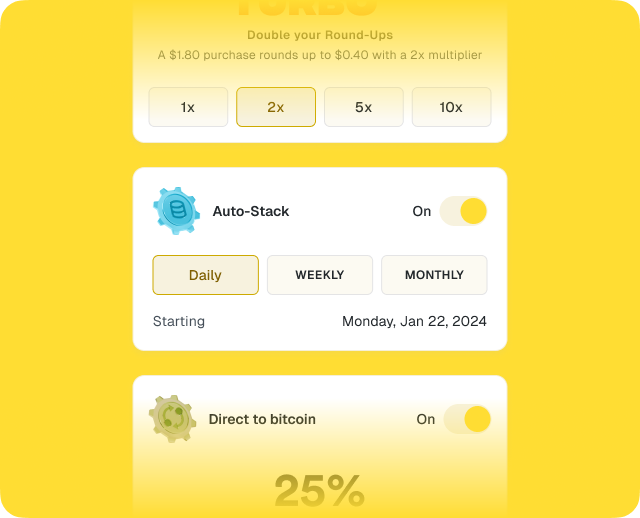
Fold’s DCA feature is called Auto Stack, and it lives in the Bitcoin tab in the app. Setting it up is designed to be quick:
- Open the Fold app and go to the Bitcoin tab.
- In the Automations area, tap Auto Stack.
- Choose how much you want to buy on a recurring basis and pick a schedule (daily, weekly, or monthly).
- Confirm the automation so purchases run from your Fold Card balance on that cadence.
Your first Auto Stack buy runs when you set it up, and then repeats on your chosen schedule around the same time. If you want to adjust the amount or timing later in the year, you cancel the existing Auto Stack and create a new one. Right now, you can have one active Auto Stack at a time.
Ways to fit Auto Stacking into your routine
To make this a “start the year off right” habit, connect Auto Stacking to patterns you already have:
- Match a familiar expense: Set a weekly Auto Stack that feels like a small lifestyle cost, like a coffee or streaming bill, and let it quietly build your stack instead.
- Monthly money check‑in: At the start of each month, when you pay bills or check budgets, glance at your Auto Stack settings and confirm the amount still feels right.
- Pro-tip: If your pay schedule is irregular, you can also use Direct to Bitcoin to dollar cost average from deposits instead of a fixed calendar cadence.
In each case, you are layering a financial habit on top of routines that already exist, not inventing a brand new behavior.
A habit your future self will notice
A new year is when a lot of people promise to “be better with money,” but vague intentions are hard to keep. A small, specific automation, like a recurring Auto Stack, is easier to maintain.
Dollar cost averaging gives you the framework. Fold’s Auto Stacking plugs that framework into your actual day to day. Set your amount, pick your schedule, and let it run in the background while you focus on your year ahead. If growing your bitcoin position is on your New Year list, open Fold, head to the Bitcoin tab, and start your first Auto Stack.
For Fold+ subscribers, additional auto stack fees do not apply beyond any spread that may be included in the quoted bitcoin price. Basic users pay a 1% fee to buy bitcoin with auto stack, and a spread may apply. See Fold’s support and legal pages for current details.
Fold does not provide financial, investment, or tax advice. This content is provided for informational and educational purposes only and does not constitute a recommendation, solicitation, or guidance regarding any financial decision or strategy.