
How to send money from your bank account to Fold
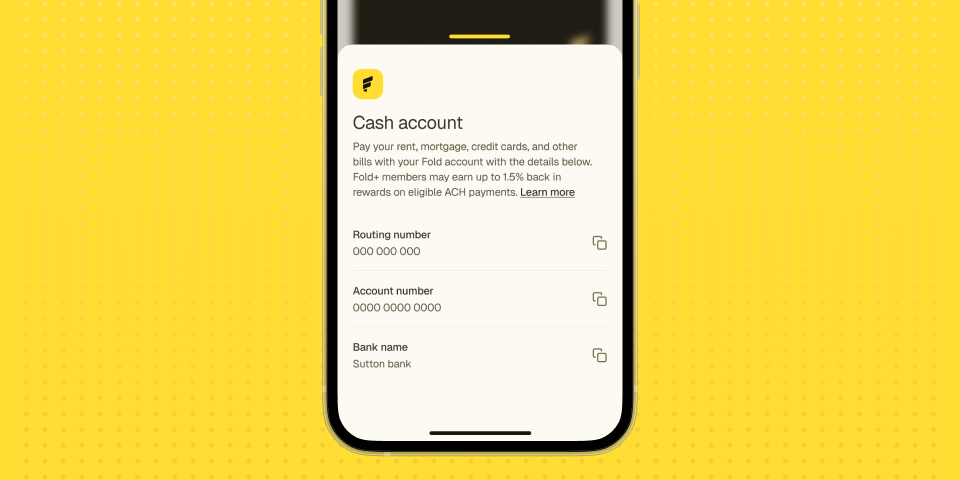
If you've been using Plaid to add money to Fold, that works. But there's another way to do it, that works with virtually any bank.
You can use your Fold routing and account numbers to set up a direct transfer from your bank's website or app. Here's how.
What you'll need:
- Your Fold account (make sure you're logged in)
- Access to your bank's website or mobile app
Step 1: Find your Fold routing and account numbers
Open the Fold app and go to the Cash page. Tap the icon in the upper right corner of the screen. You'll see your Fold routing number and account number. Copy both of these. You'll need them in the next step.
Step 2: Log into your bank
Go to your bank's website or open your bank's app. Look for a section called Transfers, Move Money, or External Accounts. The exact name varies by bank, but most banks have this feature.
Step 3: Add Fold as an external account
When you find the transfers section, look for an option to add a new account or link an external bank account. You'll be prompted to enter a routing number and account number. Use the numbers you copied from the Fold app.
Some banks may ask you to verify the account with small test deposits. If that happens, look for two small deposits in your Fold account within 1 to 2 business days, then confirm the amounts in your bank's portal to complete verification.
Step 4: Set up your transfer
Once your Fold account is added, you can set up a one-time transfer or a recurring transfer, depending on what your bank supports. Enter the amount you want to move and confirm.
How long does it take?
Most banks process transfers within 1 to 3 business days. The first transfer sometimes takes a little longer if your bank needs to verify the account.
What can I do with the money once it's in Fold?
Once your money is in Fold, you have a few options:
- Buy bitcoin directly in the Fold app
- Shop gift cards from major brands and earn boosted bitcoin rewards
- Swipe your Fold card on groceries, gas, subscriptions, and everyday purchases to earn sats on every transaction
- Pay bills through the app and earn sats on every payment
- Set up AutoStack to buy bitcoin automatically on a recurring schedule
Why use this method instead of Plaid?
Plaid is fast and convenient. This method gives you more control. You can set the exact amount and timing of every transfer from within your bank's existing interface. It also works if you use a bank that isn't supported by Plaid or if you prefer not to share bank credentials with a third party.
Both methods work. Use whichever one fits how you manage your money.
Questions?
If you run into any issues, contact Fold support through the app and we'll help you get set up.